
As we blast into 2025, marketing for small businesses becomes ever more challenging. Marketing constantly evolves and technology, algorithms, as well as consumer behaviour changes every year, which brings their own problems to solve.
So, as a small business it’s sometimes hard to keep on top of everything and anticipate what might be the marketing challenges for this year. Sadly, I’m seeing so many businesses going under – most are due to personal reasons, but I’m sure there are some that just don’t know how to get back out there.
Hopefully, this article will shed some light on some of the problems we small businesses face and give you some guidance on how you can stay ahead of the game and use marketing to keep your business afloat this year.
No marketing strategy
I’m not saying that you do, but it’s often due to small businesses not having a marketing strategy in place. Many small businesses don’t realise that you need to have long-term plans as well as the shorter more tactical goals and plans.
A marketing strategy covers both by outlining your long-term goals and then HOW you’re going to achieve those goals through marketing efforts in the short term, by defining your target audiences, your messaging, content, channels, and metrics.
The problem – without a specific strategy, it’s difficult to determine which channels are best to reach your target audience – to know who they are and where they hang out. And if you don’t measure the success of the things you do put out, such as on social media, you don’t know if what you’re doing is effective. Also, without clear goals, it’s a challenge to know where your business is and if you’re making any progress.
How to fix it – having a good marketing strategy looks at everything, from identifying your target market and having buyer personas, understanding customers’ pain points and motivations, to finding out what channels you can use to best reach them. Setting achievable goals will help you get to where you want your business to be – then you can work on the tactics you need to implement to achieve those goals.
Creating focused content
I know we say this all the time, but good content is what will get you in front of your target audience and grab their attention. But creating good content needs you to have a really good understanding of your audience and how you can address their needs, wants and pain points to engage them and promote conversions to sales.
The problem – if your content doesn’t speak to your audience, then you’ll have low engagement, which will lead to any marketing efforts failing. If your content doesn’t grab attention, people will scroll on by.
How to fix it – Know your audience – create buyer personas so you understand who and what your content needs to reach and do. Make sure that your content solves problems your audience might have and provide them with solutions or actions that will help them, depending on whether you are product-based or service-based.
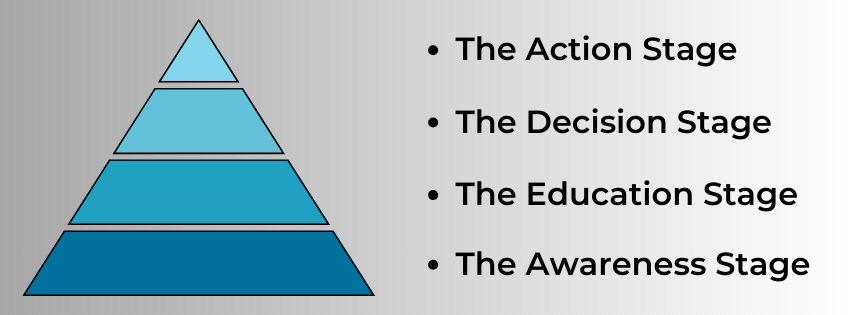
Your content needs to be purposeful – moving your potential customers on a journey from finding you, to the consideration stage and then finally to buy. This isn’t a short journey! So, create content that:
- Educates
- Entertains
- Engages
- Inspires
Include good call to actions and continually be thinking about guiding them to the next step. Ensure your content includes relevant keywords that they’ll understand, good descriptions and give easy to find links to your shop, blog, or website so they can find out more.
Always use a wide range of posts – don’t always just do selling posts.
Connect with your audience.
Linked to the last point, you need to resonate and connect with your audience. If you don’t, you could lose them.
The problem – If you don’t connect with your audience, your marketing efforts will be in vain. If you don’t put out the right messaging, or give the right impression, your reputation could suffer, and you’ll have reduced brand loyalty.
How to fix it – Ensure that you do thorough marketing research and ask your audience for regular feedback (ask for it), so you can better understand what they want, need or like. This helps you understand how your products or services can solve their problems.
Use storytelling and emotive content that grabs attention and builds that all important trust. Listen to feedback and learn from it – even negative feedback can be turned around.
You can also use email newsletters and blogs to connect with your audience, giving them more in-depth information and content, which helps nurture that all important relationship.
By taking all of this into account, you can build lasting relationships, where you understand your audience and they trust you and become loyal customers.
Social media
The reason that many social media accounts just don’t work is because of inconsistent posting, lack of engagement and failure to give an audience what they want – and the algorithms don’t always help.
The problem – You’re not growing on social media, or your growth is very slow. This, in turn, limits who your posts reach, and engagement becomes almost non-existent, so you don’t get those sales. Without these things, you miss out on building a strong community and driving traffic to your website, shop, or blog.
How to fix it – You need to have a good social media strategy, which includes regular posting, interactive content, perhaps collaborations with other businesses or influencers. You need to engage with your followers through comments and messages to build relationships. And you need to use insights or analytics to track how you’re doing and adjust accordingly to ensure you’re on track.
- Have a content calendar, even if it’s just written on a pad or in a word or excel document. Plan your posts ahead, so you know what you’re doing and when – schedule posts to help remain consistent.
- Engage with your audience through replying to comments and messages. Try to answer comments with a question where you can encourage a conversation or engagement. This gives you a deeper understanding and connection with your audience.
- Create visually appealing and valuable content that answers questions for your audience, gives them details of what they want or need, and caters to their interests.
- Collaborate with other businesses, supporting and sharing each other’s posts. If you can get an influencer on board who aligns with what you do, they’ll help you reach a larger audience.
- Review your social media insights to understand what works and what doesn’t. And act on it accordingly!
People scroll through social media to be entertained or to find a particular business or product. But mainly it’s scrolling until something catches their eye. By including a mix of posts, incorporating humour, storytelling, tutorials etc. you’ll capture attention.

Algorithms
GROAN! This is probably THE most challenging thing that small businesses face. The algorithms constantly evolve, which can have a huge impact on your engagement and visibility.
The problem – The constantly changing algorithms can prevent people from seeing your posts, your reach can go up and down, engagement can plumet one minute and suddenly surge another. This can have a detrimental effect on your business and your social media efforts can feel ignored.
How to fix it – Try and stay informed on algorithm changes and adapt where you can. Make it your priority to have high-quality, engaging content that encourages interaction. If necessary, book a coaching session with a social media expert so you are up to speed with best practices.
Understand that algorithms are based on the user experience and relevant content, so creating the right kind of content is vital.
You can’t control the algorithms, but you can control the content you put out to ensure that it is valuable, relevant, and engaging for your particular target audience. If you analyse your insights regularly, create valuable content you know your audience likes, you can adapt to the changes and your social media presence will be better.
You’re losing interest in your marketing.
This happens! You just sometimes feel like you can’t be bothered with it all.
The problem – lack of focus in your marketing efforts can leave to a reduced impact and effectiveness of your content, diluted messages, and chaos. Your engagement will fall, and you’ll get less customers and followers will fall away.
How to fix it – Ensure you have clear business goals and marketing objectives that align and support them.
Regularly review and amend your goals to make them more achievable. If a goal seems too big a mountain to climb, break it down into more manageable chunks.
A marketing strategy will help you remain focused on what matters to your business and gives you direction as to what you need to do to keep your business at the forefront of your target audience’s minds. It also helps you focus on the channels where your target audience hangs out, so you’re not trying to be on loads of different platforms and spreading yourself too thin.

Standing out in the crowd
2025 is going to see more new businesses and products emerging and standing out in the crowd is a big challenge for small businesses.
Ensure you have a unique brand position (USP) that states clearly what makes your product or service different or better than the rest. How are you different from your competitors?
Make sure that you focus on giving an excellent customer experience at every single touch point that your customers have with your business. From website and social media to blog posts and email or messages, ensure that the service you give is second to none, be transparent and consistent and you’ll find customers will be loyal to you and your brand and will recommend you to their friends and family.
Finally, produce high quality, original, engaging content that perfectly highlights you and your business and your expertise.
Conclusion
I’m sure that there are many more marketing problems out there, and marketing is never an easy ride. 2025 is going to continue to bring challenges to small businesses all over the world, but by being proactive and having a robust strategy, you’ll be able to navigate anything that’s thrown at you.
Marketing isn’t just about short-term gains, it’s the marathon, building long-term relationships with customers and having a sustainable plan for your business’s success. Having a strategy in place and with your dedication to your business and creativity when it comes to your content, you can achieve your goals, and your business will be a success. If you’d like help with any of the things I’ve mentioned in this article, feel free to get in touch. I offer a free 30-minute consultation.





















 The Write Way